
HOMER Knowledge Base
Adding a generic power source
Some users request a way to add a power source from imported data to HOMER, for example, from another simulation tool like PVsyst. We may add more functionality for this in the future, but for now there is a workaround that you can use.
1) Add a Concentrating PV. Set the derating factor to 100% (no derating) and the DNI rating condition to 1 (1 kW/m^2 input = 1 kW output).
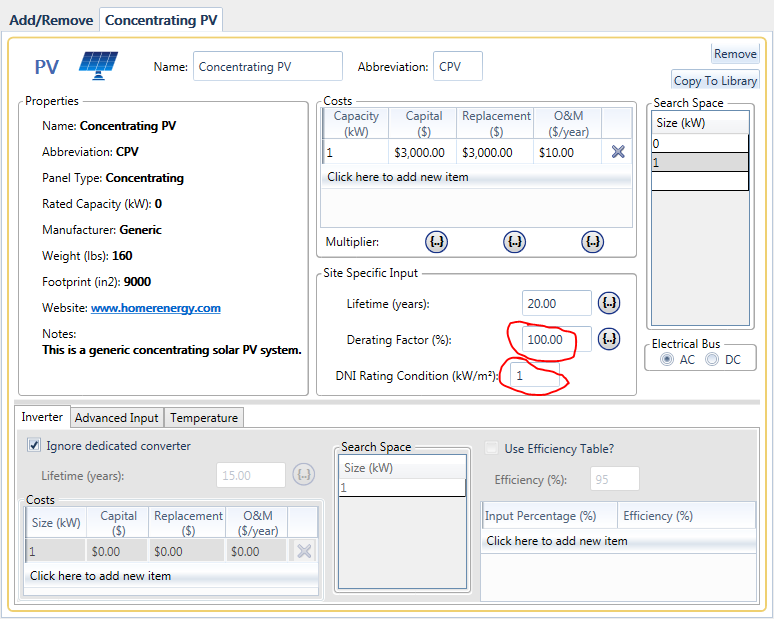
2) Add a Solar DNI resource and choose "Import and edit...". Import your data from PVsyst (use "Import and edit..." because it works better). HOMER needs data in a single column, with no header rows, for exactly one year. HOMER can take data in any time step between 1 minute and 1 hour and will infer the time step by assuming the data is one year long.
3) This is now your "PV". It will produce a power output equal to the number listed in your time series file for each time step. You can add cost data, lifetime, and even add a search space if you want to consider different quantities.
You can also use a hydrokinetic turbine (or a wind turbine) to accomplish the same:
1) Add a hydrokinetic turbine. Enter just two points in the power curve: (0,0) and (1e3, 1e3). If you have data in watts (not kW), use the points (0,0) and (1e6, 1e3). This assumes that you don't have any power output bigger than a MW. If you do, use larger numbers, i.e. (1e6, 1e6).
2) Add a hydrokinetic resource and choose "Import and Edit...". Import your data.
You can perform a similar workaround with the wind turbine if you are already using a hydrokinetic resource for your model. If you use the wind turbine, be sure that the turbine hub height and the wind resource anemometer height are the same. We usually suggest selecting 10 meters for both.